

Learn how to turn a blog post into a video: pick the right articles, cut to one idea, script for the ear, and produce with VidSpotAI.
How to Convert a Blog or Article into a Video
A published article works in one place. It sits on a blog, competes for organic traffic, and reaches people who were already searching for that topic. The same idea rebuilt as a video reaches a different audience entirely, on platforms where nobody is reading long-form text.
The obstacle was never the idea. It was production. Scripting, recording, sourcing footage, editing, and exporting used to take longer than writing the article did.
That gap has closed considerably, but the tools only handle the second half of the job. The first half is editorial: deciding which article deserves a video, what to cut, and how to restructure writing meant for the eye into something built for the ear. Skip that, and the tool produces a slideshow nobody finishes. Both halves are covered below.
Why article-to-video repurposing is worth the effort
The straightforward argument is reach. An article ranks for the terms people type into a search bar. A video from the same article can surface on YouTube, TikTok, Instagram, or LinkedIn, where discovery works through recommendation rather than search. Some of your audience prefers watching. They will never find the written version.
The second argument is production economics. The research is finished. The structure is set. The examples are chosen. Converting an existing article skips the hardest and slowest part of making a video, which is deciding what to say.
Set expectations accordingly. A first conversion usually takes an hour or two, most of it spent on script decisions rather than on the video itself. Once you have a script format that works, later conversions move considerably faster because the editorial pattern is already established.
Not every blog post should become a video
This is where most repurposing efforts go wrong. Some articles convert well. Others resist the format entirely.
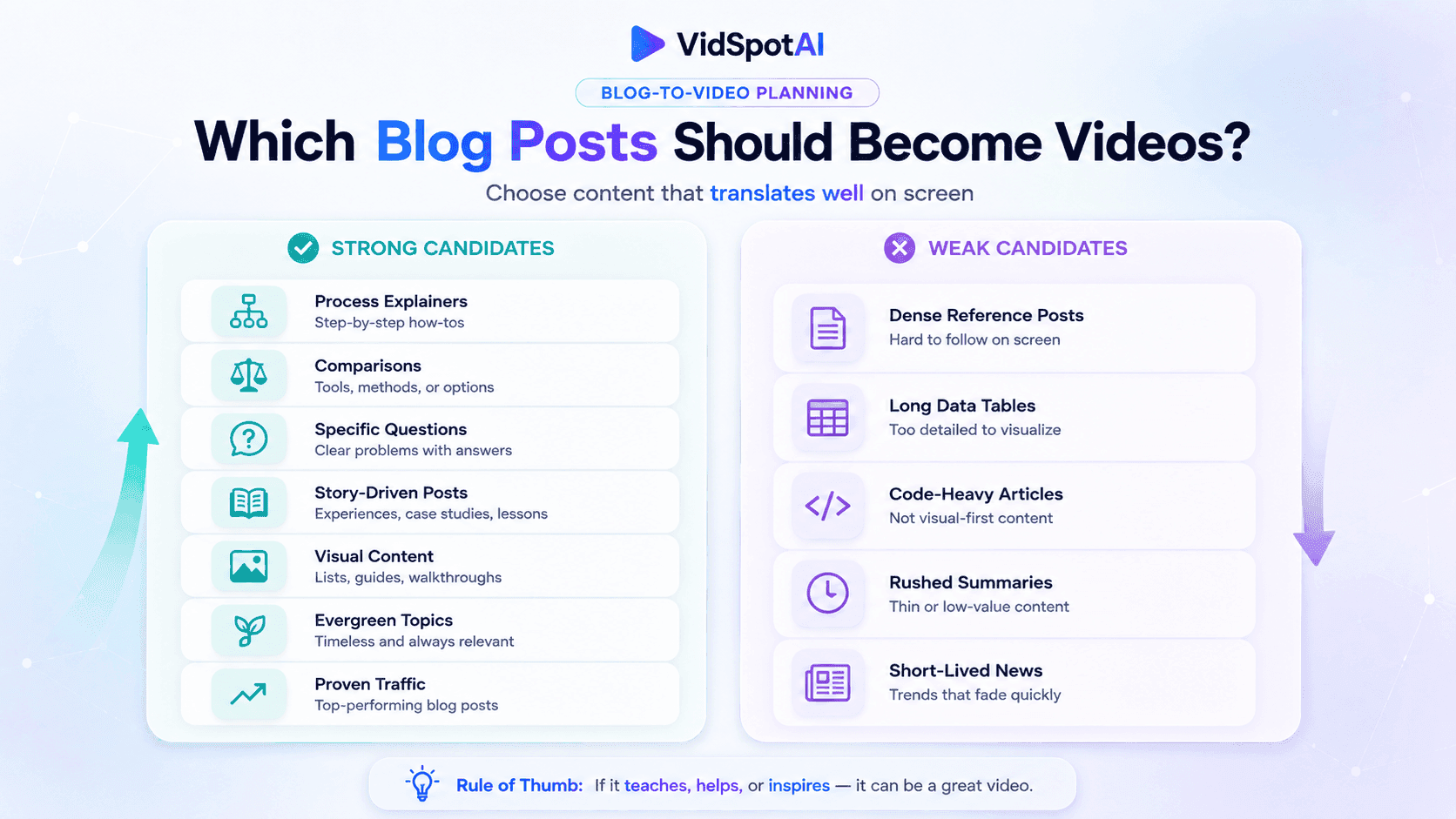
Strong candidates
Strong candidates share a few traits. They explain a process, compare options, answer a specific question, or tell a story with a clear arc. They contain something visual, whether a screenshot, a chart, a product, or a physical action. And they are evergreen, so the video keeps earning attention months after publication.
Weak candidates
Weak candidates are dense reference articles, posts built around long data tables, anything heavy with code, and news pieces that expire in a week. A 3,000-word technical breakdown does not become a good five-minute video. It becomes a rushed summary that serves nobody.
One more filter: check which posts already perform. An article with steady traffic has proven the topic has an audience. That is a better signal than guessing which idea will translate.
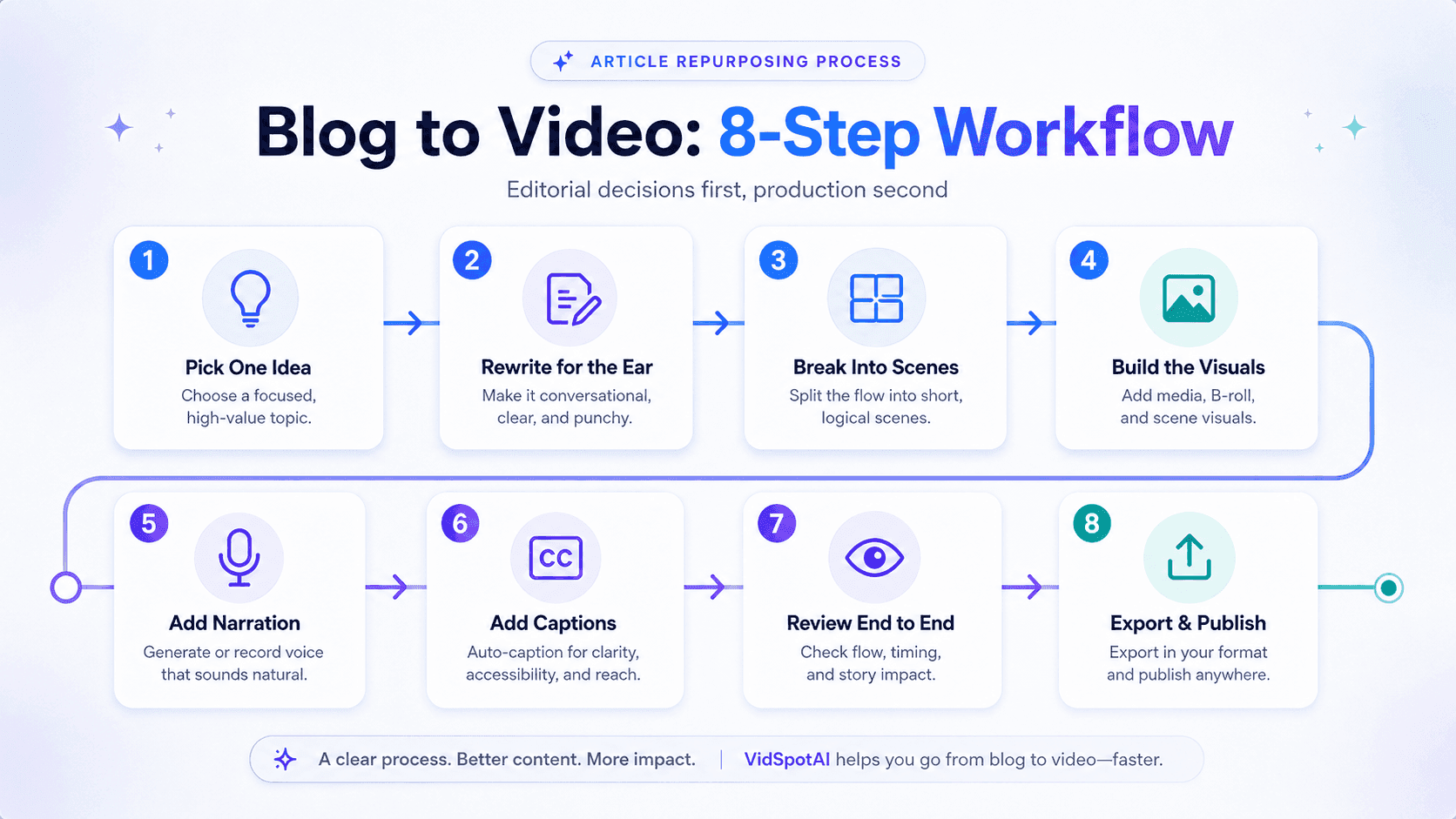
Blog-to-Video - Step by Step Process
The following steps outline how to turn a written blog into a structured and engaging video:
Step 1: Reduce the article to one idea
A well-written article can carry five or six supporting points. A video cannot, at least not one person, finish.
Pick the single idea the article is really about and build the video around that. If the post covers six tactics, the video covers the strongest one, or it becomes six separate videos.
Decide on the one idea before writing a word of script. Everything that does not support it gets cut, however good the writing is.
Length follows from this. Narration sits comfortably around 140 words per minute, so a 90-second video needs roughly 200 to 250 spoken words and a three-minute explainer around 400 to 450. Against a 2,000-word article, that is a heavy cut, and knowing the target before drafting prevents writing a script that has to be dismantled later.
Step 2: Rewrite for the ear, not the eye
Reading a blog post aloud produces a video that sounds like someone reading it aloud. Written and spoken language are structurally different.
Written sentences can be long and heavy with subordinate clauses because readers control the pace and can reread. Listeners cannot. Spoken scripts need short sentences, one idea per sentence, and natural breathing points.
This is also the most common cause of robotic-sounding AI narration. Text-to-speech models pause where punctuation tells them to, so page-style scripts with long formal sentences produce flat, breathless delivery. The fix is in the script, not the voice setting: shorten sentences, add commas and periods where a person would naturally breathe, and write in the register you would actually speak in.
Practical conversions:
- Turn headings into spoken transitions. "Three Common Mistakes" becomes "There are three mistakes that come up again and again."
- Replace parenthetical asides with separate sentences, or cut them.
- Open with the payoff. Readers skim to find the useful part; viewers leave.
- Read the draft out loud. Anywhere you stumble, the AI voice will stumble too.
Step 3: Break the script into scenes
A video is a sequence of visual moments, not a wall of narration. Each distinct point needs its own scene.
A workable rule is one idea per scene, with the visual changing every time the point changes. Scenes that carry more information need longer on screen; transitional ones can move faster. If a single image holds while the narration covers three separate ideas, the pacing is wrong.
Map each script beat to a visual before generating anything. Doing this in a document first takes ten minutes and prevents the most common failure, which is a video where the narration moves on, but the picture does not.
Step 4: Build the visuals
Three approaches, and most good videos mix them.
Generated footage works when the script describes something conceptual or cinematic. This is where AI video models do their best work, producing short clips from a text description of the scene.
Your existing images are the most underused asset in repurposing. The article already contains screenshots, diagrams, product photos, and header images. Image-to-video tools animate these into moving shots, adding motion and depth to material you already own. For tutorials and product explainers, an animated screenshot beats generated footage every time, because it shows the actual thing.
A presenter suits explanatory content, opinion pieces, and anything where a face builds trust. AI avatars deliver a script to camera without filming, which matters if you do not want to appear on video or do not have a studio setup.
VidSpotAI covers all three. It runs text-to-video and image-to-video generation and includes AI avatar creation with lip sync on its Pro plan, so a single script can be built as generated scenes, animated article images, a presenter-led piece, or a combination.
Step 5: Add Narration
AI voiceover has improved substantially, but three failure patterns still ruin otherwise decent videos.
Flat prosody, where every sentence lands in the same narrow pitch range and questions sound like statements. Missing pauses, because synthetic voices break where the punctuation tells them to rather than where a speaker would naturally draw breath. And mismatched pacing in translated versions, since a direct translation often runs longer or shorter than the original, leaving narration out of step with the same visuals.
The first two are script problems, fixed in Step 2. The third matters if you are producing multilingual versions: adjust the translated script for length rather than translating directly. Platforms with multilingual generation built in make several language versions from one script practical. VidSpotAI supports 40+ languages, so an article that performs in English can be tested in other markets without rewriting the workflow, though each version still needs a listen before it goes out.
Step 6: Handle captions before publishing
Social feeds autoplay video muted by default, so viewers often meet the first seconds without hearing any of it. Captions are not optional.
Platform-level captioning is the most reliable route. YouTube generates captions automatically and lets you upload a corrected SRT file, which is worth doing because auto-captions mangle technical terms and brand names. Instagram, TikTok, and LinkedIn all offer caption options at upload.
The script is already the caption text, so formatting it into an SRT file takes minutes and beats automatic transcription of synthetic speech.
Step 7: Watch it once, all the way through
AI video tools still make mistakes: a scene that does not match the narration, a mispronounced name, and text that runs off frame. Most are quick corrections rather than regenerations, which is why a browser-based editor matters more than it sounds. VidSpotAI includes one on every plan, so a mistimed scene can be adjusted without rebuilding the video.
Watch it start to finish before publishing and fix what the pass turns up. It takes a fraction of the time the rest of the process did, and it separates content that represents your brand from content that undermines it.
Step 8: Export and publish
Export one version at a time rather than generating every format at once. The first export should be the one going into the article itself, because that placement is entirely under your control, and it improves the page the writing already lives on.
Keep the source files. A finished video is rarely finished forever, and having the script, the scene breakdown, and the exported master means a future update means adjusting a scene rather than starting again.
Turning one article into several videos
The efficient play is not one video per article. It is several videos from one.

A single well-structured post can produce a long-form explainer covering the full argument, two or three short vertical clips each taking one point, and a square version for feed placement. The script work is already done. What changes is length, aspect ratio, and which section leads.
Match format to platform. Vertical 9:16 for TikTok, Reels, and Shorts. Horizontal 16:9 for YouTube and embedding back into the original blog post. Square 1:1 for feed posts where either orientation displays acceptably.
That last one is worth emphasizing. Embedding the video into the article it comes from gives visitors a choice of formats and keeps them on the page longer.
VidSpotAI states that it optimizes content for social platforms significantly, so one script can be adapted for several destinations rather than rebuilt each time. Confirm the exact aspect ratios and export options available on your plan before committing to a distribution schedule.
Common mistakes when converting articles to video
The following are some of the most common mistakes to avoid when turning an article into a video:
Reusing the article headline as the video title
A search headline is written for someone already looking for the topic. A video title has to stop someone who was not looking for anything. The same words rarely do both jobs.
Converting the whole archive at once
The first conversion teaches you what your audience responds to and how long the workflow takes. Producing twenty videos before publishing one repeats the same mistakes twenty times.
Uniform scene lengths
Scenes of identical duration make a video feel mechanical, however good the visuals are. Hold longer on the points that carry weight.
Forgetting the link back
The video should feed the article as well as stand alone. A description with no link to the source post wastes the traffic the video earns.
Skipping the muted playback check
Watch it once with the sound off. If the point does not survive without narration, the on-screen text or visuals need work.
Where VidSpotAI fits in this workflow
The editorial steps above are yours. Choosing the article, cutting to one idea, and writing for the ear cannot be automated well, because they depend on knowing your audience.
Production is where a tool earns its place, and VidSpotAI is built for the parts of this workflow that consume the most time.
Multiple AI models in one platform
VidSpotAI provides access to Pixverse, Veo, Kling, Hailuo, Haiper, Seedance, Hunyuan, Runway, Midjourney, and Luma. This matters for article conversion specifically, because a single video often requires different visual treatments across scenes, and different models suit different styles. Working in one platform avoids assembling scenes from three separate subscriptions.
Length that matches format
VidSpotAI generates videos up to 10 minutes long, which covers the full range this workflow produces, from short vertical clips through standard explainers to long-form YouTube content.
Output in 40+ languages
One compressed script can become several language versions, which matters most for evergreen articles that have already proven demand in their original language.
An AI agent for the first draft
The Pro plan includes autonomous video creation, useful for producing a rough version quickly and refining from there rather than building every scene manually.
Pricing runs from $15 per month on Basic to $38 on Pro and $75 on Business, billed annually, with a one-day free trial on each.
FAQs
How long should a video made from a blog post be?
Match the platform, not the article. Vertical social clips generally run 30 to 60 seconds and cover one point. YouTube explainers commonly run two to five minutes. A 2,000-word article does not need a 20-minute video; it needs one idea told well.
Can the whole article be converted automatically?
Automated conversion produces a usable starting point, not a finished video. It keeps too many points, preserves written sentence structure, and matches visuals on keywords rather than meaning, so scenes often illustrate a word from the script instead of the idea behind it. Treat automatic output as a first draft and apply the editorial steps above to it.
Should the video repeat the article or say something different?
It should say less, not something different. The video covers one idea from the article properly rather than summarizing all of them thinly. Leaving material out is the point of the format.
Can I use my own voice instead of AI narration?
Yes, and it is often better for opinion pieces and personal brands where the voice is part of the appeal. AI narration wins on speed and on producing multiple language versions from one script. Many creators split the two by content type.
What happens to the video if I update the article later?
Nothing automatically. Videos do not re-render when the source post changes, so a substantial rewrite means either regenerating the affected scenes or accepting that the versions diverge. Choosing genuinely evergreen articles reduces how often this comes up.
How much of a monthly credit allowance does one video use?
That depends on length, model, and how often scenes are regenerated. VidSpotAI allocates 100 credits a month on Basic, 250 on Pro, and 500 on Business, so generate one complete video early to see what a typical project costs before planning a schedule around it.
Do I still need the blog post if I have the video?
Yes. They serve different discovery mechanisms. The article works in search; the video works in recommendation feeds. Embedding the video in the article strengthens both.
What if the article has no images to work with?
Generated footage covers the gap. Text-to-video handles scenes the article describes but never illustrated, which is common in opinion pieces and explainers. A presenter-led version is the other route, since a script delivered to the camera needs no supporting imagery at all.
Getting started
Once the article is chosen, the process comes down to eight stages: cut it to one idea at a workable script length, rewrite it for speaking, break it into scenes, build the visuals, add narration, caption it, review it in full, and export it for where it is going.
The editorial thinking is the part that determines whether the video is worth watching. Production is the part that used to make it impractical.